FormGoat for Chrome: fill any web form from your documents
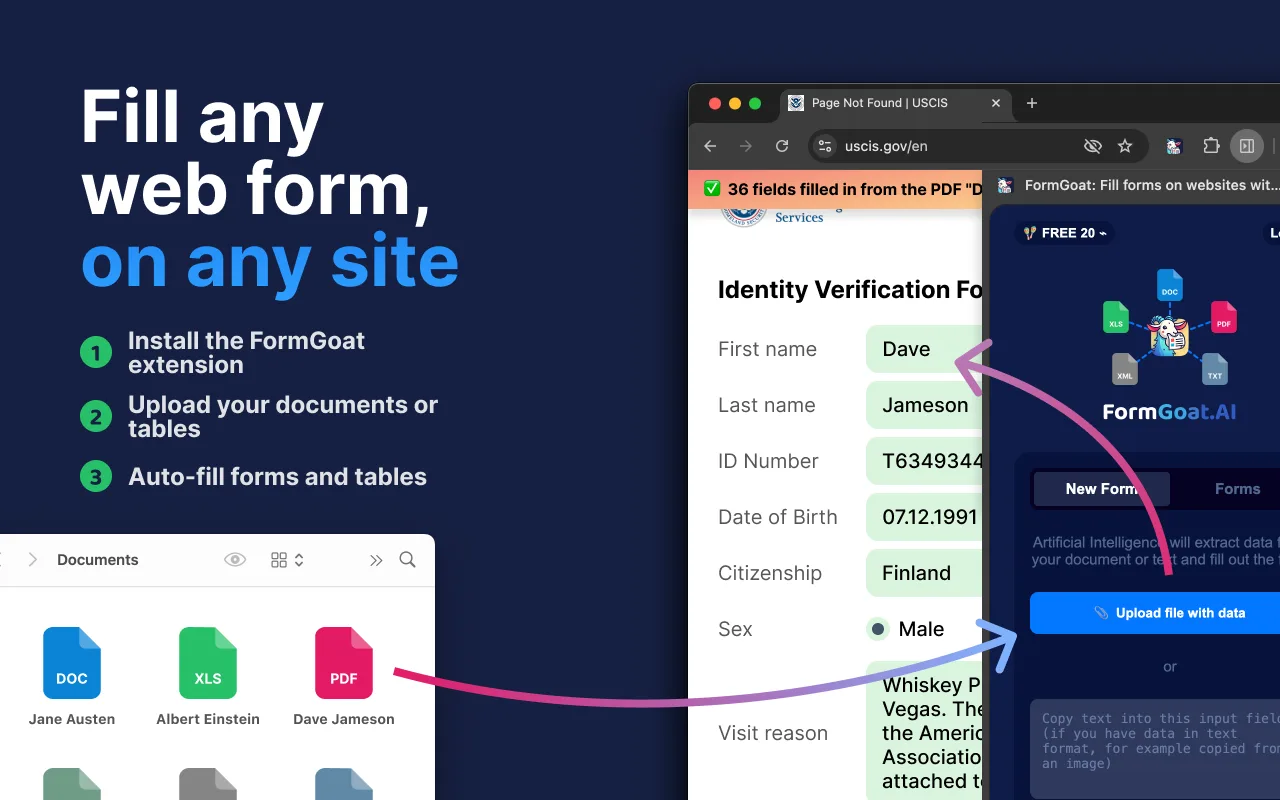
Most of the data a web form asks for already sits in documents you have: a passport, a contract, an employment letter, a spreadsheet exported from your own system. The FormGoat extension for Google Chrome reads those documents and types the values into the form for you, on any site, whatever the fields happen to be called.
This overview covers what the extension does, how it works, the kinds of forms it handles well, and what happens to your documents along the way.
How it works
- Install and sign in. Add FormGoat from the Chrome Web Store and pin it to the toolbar. It opens as a side panel next to the page. Sign in with Google or with a six-digit code sent to your email; no password is involved.
- Upload the documents that hold the data. Drag in up to ten files at once, or paste text straight into the panel. The AI reads them and builds a profile: names, dates, document numbers, addresses, table rows.
- Open the form and click Fill form automatically. FormGoat looks at every field on the page, decides what each one is asking for, and fills it from the profile. Filled fields are highlighted so you can see at a glance what changed.
The profile stays in the Forms tab of the panel. Next time the same person or company needs another form, you open the profile and fill it, without uploading the documents again.
It matches fields by meaning, not by label
Browser autofill and most form-filling tools work from a saved list of values and a guess based on the field's name. That breaks as soon as a portal calls the field something unexpected, or is written in another language.
FormGoat reads the whole form the way a person would: the label, the hint under the field, the options in a drop-down list, the section the field sits in. So "DOB", "Geburtsdatum" and "Date de naissance" all get the same date of birth, and a passport issued in one language can fill a form written in another. The extension handles radio buttons, checkboxes, drop-down lists and date pickers as well as text fields.
Tables, timesheets and logbooks, cell by cell
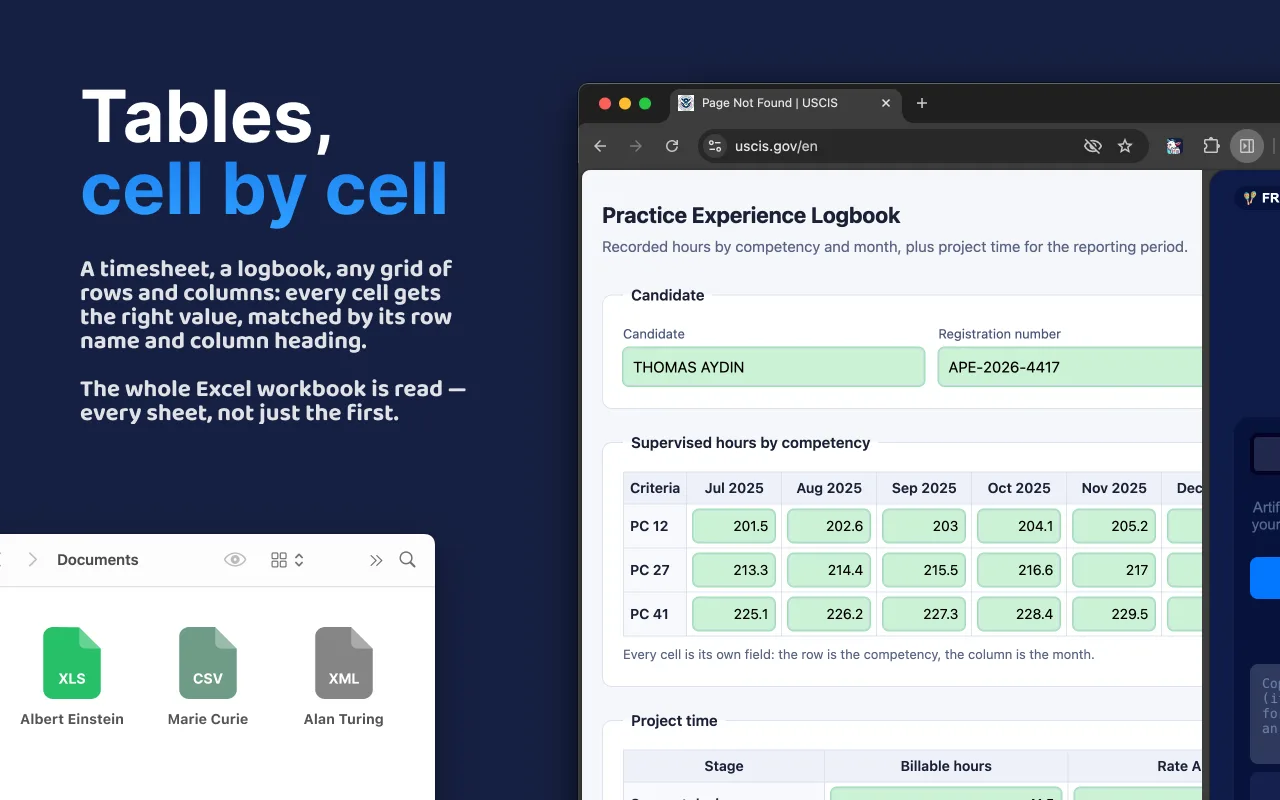
Some forms are not a list of fields but a grid: competencies down the side, months across the top, a number in every cell. Copying a spreadsheet into that by hand is some of the slowest paperwork there is.
The extension reads the entire Excel workbook, every sheet and not only the first one, and puts each value into its own cell. A cell is matched by its row name and column heading rather than by a field name, so the table transfers row by row and column by column. This is how people fill supervised-experience logbooks for regulated professions, monthly timesheets for an agency portal, grade sheets, bills of quantities in tenders and reporting forms by quarter.
Multi-step forms and fields that appear later
Government and bank portals often reveal new questions after you answer earlier ones: pick "married" and the spouse section appears. If new fields show up after a fill, click Fill form automatically again and FormGoat fills whatever is new on the page. The same goes for forms split into several steps: fill the step you are on, move to the next one and fill again, from the same profile.
If a field cannot be matched, it stays empty rather than getting a guess, and you can drag a value from the panel into it by hand.
You stay in control
FormGoat fills the form; it never submits it. You review the highlighted fields, correct anything you disagree with, and press the portal's own Submit button yourself. For applications that carry legal weight, such as visas, permits and court filings, that review step is the point: the AI saves the typing, and the decision stays with you.
Who uses it
- Immigration and visa practices filling the same residence, work-permit and embassy portals for several clients a day.
- Notary, registry and civil-records offices entering records from client documents and scans.
- Accounting, HR and procurement teams: supplier onboarding and KYC questionnaires, employee paperwork, tender registrations.
- Study-abroad and admissions agencies moving a student's data into several university application portals.
- Anyone who keeps retyping the same passport details into registration and booking forms.
What it reads
Documents (PDF, DOC, DOCX, ODT, RTF, TXT), spreadsheets (XLS, XLSX, CSV, ODS, TSV), images (JPG, PNG, HEIC and more) and structured files such as HTML, JSON and XML. Scans and photos go through text recognition first, so a phone picture of a passport works. Documents in different languages can be mixed in one upload.
The extension interface is available in 60 languages.
What happens to your documents
Reading a document with AI means processing it on a server, so here is exactly how that works:
- Files are processed on FormGoat's servers, not in the browser. Hosting and the database are in the EU (the Netherlands). Text recognition and AI extraction are done by providers in the USA under Standard Contractual Clauses.
- Uploaded files are deleted automatically 14 days after upload. The extracted profile is kept for one year, so you can reuse it.
- Data is encrypted in transit. A data processing agreement is available to business customers.
The details are in the Privacy Policy.
Pricing
The extension is free to install, and your first 5 forms are free with no card required. After that, the Plus plan (€18 a month) includes 300 fills, and Premium (€48 a month) includes 1,500. One fill is one web form filled by the extension. The same balance also covers FormGoat Docs and the DS-160 desktop app. See all plans.
Stop typing the same data into every form
Free to install. Your first 5 forms are free, no card required.