FormGoat DS-160: a desktop app for the US visa application
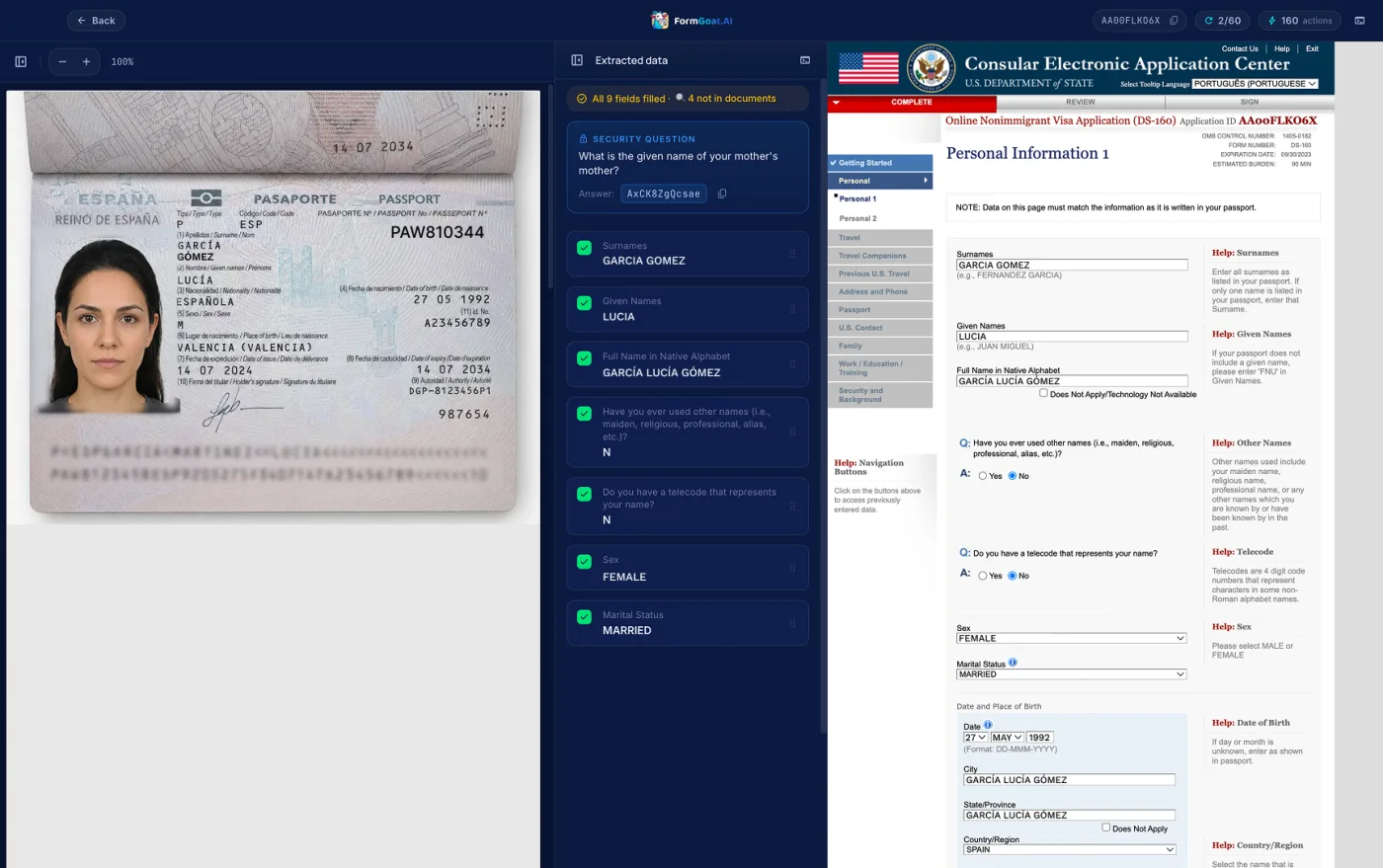
The DS-160 is the online application for a US non-immigrant visa, and it is one of the least forgiving forms on the web: dozens of pages, questions that open new sections depending on earlier answers, strict formats, and a session that times out. FormGoat DS-160 is a desktop app for macOS and Windows built for this one form. It reads the applicant's documents and fills the application on ceac.state.gov, while you watch every value go in.
It is aimed at people who fill the DS-160 for others: visa agencies, immigration lawyers, corporate mobility teams. It works just as well for a single applicant filling their own.
Three panes, one screen
The app puts everything you need side by side: the source documents on the left, the data extracted from them in the middle, and the official DS-160 page on the right, opened in a browser built into the app. There is no switching between tabs and no copy and paste, and a stray click can't close the application.
The app walks the form from start to finish. It fills the visible fields first, then answers the conditional questions that reveal hidden sections, and fills those too. Most generic form fillers stop at exactly this point: a field that doesn't exist until you answer "Yes" to the question above it.
How it works
- Upload the applicant's documents. A passport scan, the client questionnaire (often a Word file), employment letters, previous DS-160 confirmations. The app combines them into one consistent profile.
- Start the application. The DS-160 opens inside the app, and the app fills each page from the profile.
- Review and correct. Every value shows where it came from. Drag the right value from the middle pane onto any field, or type it in.
- Sign and submit yourself. The app never presses Submit. The final check, and the responsibility for the application, stay with you or your client.
Honest about what it knows
Each value is marked by where it came from:
- Found in the documents: a green check.
- Inferred by the AI: a sparkle, for example a value worked out from other answers rather than read from a document.
- Missing: an orange flag, so the field gets your attention instead of slipping through empty.
For an application where one wrong answer can cost an interview, knowing which values to double-check is worth as much as the typing the app saves.
Drag any value anywhere
Names, dates, drop-down lists and radio groups can all be corrected by dragging a value from the extracted data onto a field on the DS-160 page. Format conversions, such as splitting a date into day, month and year lists, are handled for you.
Bulk import for agencies
If your applicants come from your own database or a spreadsheet, the app can take a consolidated Excel or CSV export and split it into individual applications, each ready to fill. A group trip, a company transfer or a season of student visas stops being a week of data entry.
Coming back to an application
A DS-160 is rarely finished in one sitting. The app shows the application ID and the answer to the security question next to the form, the two things ceac.state.gov asks for when you retrieve an unfinished application.
What happens to the data
- Source documents are sent for AI extraction. Hosting and the database are in the EU (the Netherlands). Text recognition and AI extraction are done by providers in the USA under Standard Contractual Clauses.
- The application is filled on your computer, and the form is submitted directly from your computer to ceac.state.gov. FormGoat doesn't see what you submit to the US Department of State.
- Application data is kept for one year and deleted automatically. When you delete an application, its personal data is deleted too, including the security question answer.
The details are in the Privacy Policy.
Download and pricing
The app runs on macOS 12 or later (Apple Silicon and Intel) and on Windows 10 and 11 (x64). The Windows version is in the Microsoft Store.
It is free to install, and the first 5 forms are free. To fill applications regularly, choose one of the plans. The balance is shared with the Chrome extension and FormGoat Docs, so an agency that also fills embassy portals and PDF forms pays from one account.
FormGoat is an independent product and is not affiliated with or endorsed by the US Department of State. The DS-160 is always submitted by the applicant or their representative, who is responsible for the answers.
Filling DS-160s for clients? Stop typing.
Free to install on macOS and Windows. The first 5 forms are free.