FG: Audiobook Maker: turn MP3 files into an M4B audiobook on your Mac
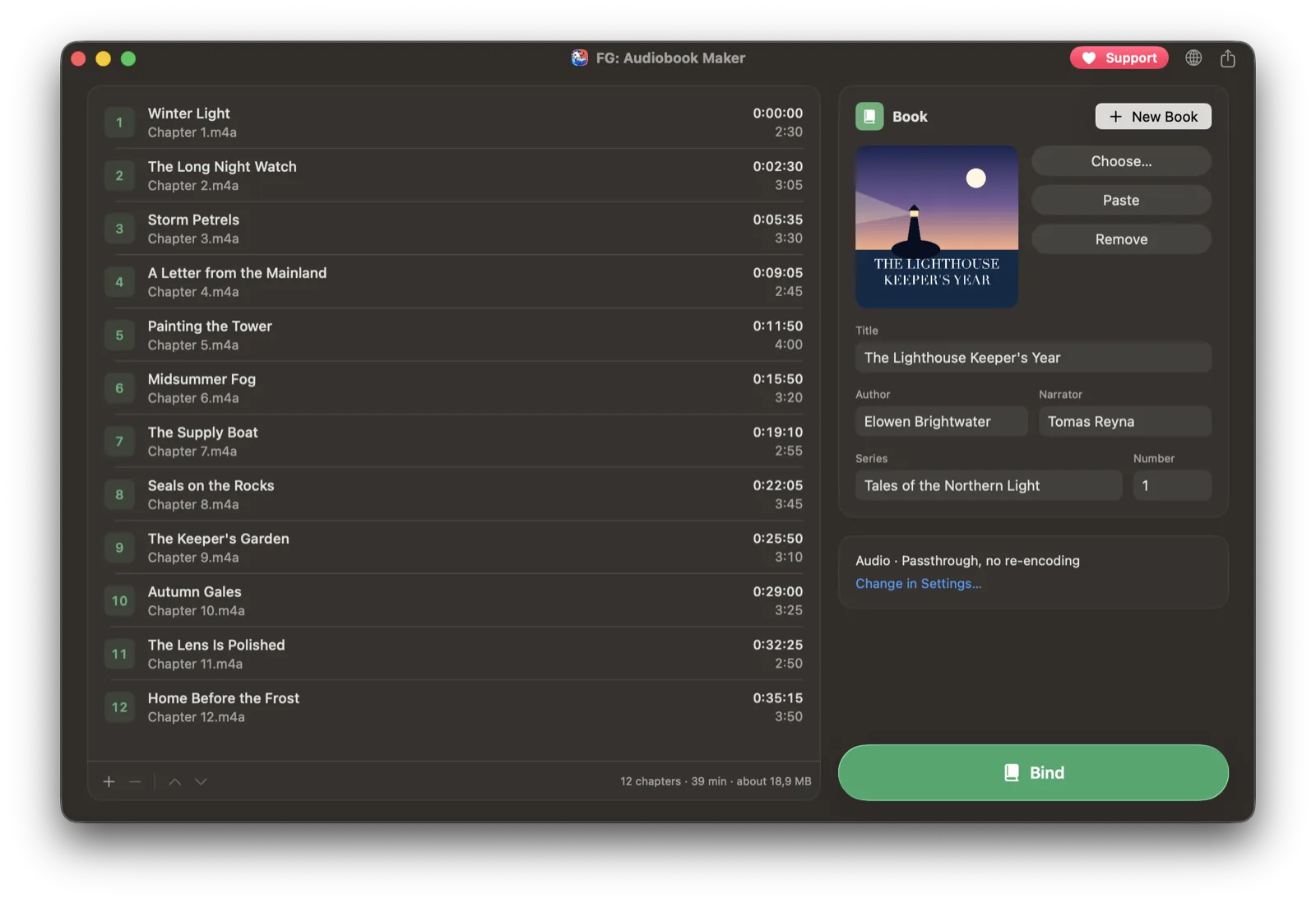
An audiobook bought on CD or downloaded from a library often arrives as a folder of MP3 files: dozens of tracks, no chapters, no cover, and Apple Books treats every file as a separate item. FG: Audiobook Maker is a small, free macOS app that binds those files into a single M4B audiobook, with chapters, cover art, author and narrator, so it plays like one book.
Everything happens on your Mac. There is no account, nothing is uploaded, and the original files are never changed.
FG: Audiobook Maker
Free on the Mac App Store, for macOS 14 and later.
How it works
- Drop the files. Drag in files or a whole folder, even one with CD 1, CD 2 inside. Each file becomes a chapter, sorted the way Finder sorts them and named after the file. Files that already have chapters inside, such as M4B, keep them.
- Check the details. Title, author, narrator and cover are filled in from the tags of the first file. Drag chapters to reorder them and double-click a title to rename it.
- Click Bind. The app creates the M4B, checks that chapters, cover and tags are all there, and adds the book to Apple Books.
Formats and quality
MP3, M4A, FLAC, WAV and other common audio formats can be mixed in one book. If every file is already AAC with the same settings, the audio is copied as is, with no quality loss and very fast. Otherwise it is encoded to AAC with the quality you choose in Settings.
Chapters that work
Chapters show up in Apple Books and Music, start exactly where each file begins, and keep their names. Before a book is saved, the app verifies its chapters, cover, tags and playback, so a broken file never reaches your library.
Where the book goes
The first time you click Bind, you choose a folder, and the book is saved there as "Author - Title.m4b" and added to Apple Books. In Settings you can pick another folder, or add books to Music instead.
Private by design
The audio is processed on your Mac, and the app never sends your files anywhere. No account, no uploads, and the originals stay untouched.
Free, with optional sponsorship
All features are free: no trial, no limits on the number or length of books, no watermark. If the app saves you time, you can become a sponsor.
FG: Audiobook Maker runs on any Mac with macOS 14 Sonoma or later, Apple Silicon or Intel. It is on the Mac App Store; a DMG for direct download is also available.
Turn a folder of MP3s into a real audiobook
Free, with no limits. Runs entirely on your Mac.